Cyrus Cueva Baruc

MSFT Certified Power BI Developer
City: Lapu-Lapu City
Region: Cebu Philippines 6015
Phone: +639565028805
Email: cirobar@outlook.com
LinkedIn: Let's Connect
Resume: Click to View
Exploratory Data Analysis (EDA) and Data Preparation
Dataset:
- Loan Status Data for Credit Scoring
- Filename: loans_train.csv
- Target variable: Loan_Status
Import libraries
import numpy as np
import pandas as pd
import matplotlib.pyplot as plt
import seaborn as sns
sns.set_style("whitegrid")
sns.set_context("paper", font_scale=1.0)

%matplotlib inline
# Set Options for display
pd.options.display.max_rows = 1000
pd.options.display.max_columns = 100
pd.options.display.float_format = '{:.2f}'.format

#Filter Warnings
import warnings
warnings.filterwarnings('ignore')
Load the dataset
- Specify the parameters (filepath, index column)
- Check for Date-Time Columns to Parse Dates
- Check Encoding if file does not load correctly
# to check your working directory
%pwd

# to change your working directory, use
# %cd
'C:\\Users\\cbaruc\\Downloads\\EDA'
df = pd.read_csv('loans_train.csv')
Describe the data
Verifying the data: Look out for the following
- Unexpected missing values
- Incorrect or unexpected data types and format
- Duplicates
- Unexpected dimesions (i.e. missing rows or columns)
- Incorrect spelling
- Mixed cases for strings
- Unexpected outliers or anomalous values
- Inconsistent or incorrect units of measurements
# Check for unexpected missing values
total = df.isnull().sum().sort_values(ascending=False)
total
Credit_History       50
Self_Employed        32
LoanAmount           22
Dependents           15
Loan_Amount_Term     14
Gender               13
Married               3
Loan_ID               0
Education             0
ApplicantIncome       0
CoapplicantIncome     0
Property_Area         0
Loan_Status           0
dtype: int64
# Check for Incorrect or unexpected data type & format
df.dtypes
Loan_ID               object
Gender                object
Married               object
Dependents            object
Education             object
Self_Employed         object
ApplicantIncome        int64
CoapplicantIncome    float64
LoanAmount           float64
Loan_Amount_Term     float64
Credit_History       float64
Property_Area         object
Loan_Status           object
dtype: object
# Check for duplicates
df.duplicated().value_counts()
False    614
Name: count, dtype: int64
# Data Preparation - Handle Duplicates
df.drop_duplicates(inplace=True)
# Check Categorical Column Values
df.select_dtypes(include=['object']).head()
| Loan_ID | Gender | Married | Dependents | Education | Self_Employed | Property_Area | Loan_Status | |
|---|---|---|---|---|---|---|---|---|
| 0 | LP001002 | Male | No | 0 | Graduate | No | Urban | Y |
| 1 | LP001003 | Male | Yes | 1 | Graduate | No | Rural | N |
| 2 | LP001005 | Male | Yes | 0 | Graduate | Yes | Urban | Y |
| 3 | LP001006 | Male | Yes | 0 | Not Graduate | No | Urban | Y |
| 4 | LP001008 | Male | No | 0 | Graduate | No | Urban | Y |
# Check for misspellings and mixed cases for Categorical Data
df.select_dtypes(include=['object']).describe()
| Loan_ID | Gender | Married | Dependents | Education | Self_Employed | Property_Area | Loan_Status | |
|---|---|---|---|---|---|---|---|---|
| count | 614 | 601 | 611 | 599 | 614 | 582 | 614 | 614 |
| unique | 614 | 2 | 2 | 4 | 2 | 2 | 3 | 2 |
| top | LP001002 | Male | Yes | 0 | Graduate | No | Semiurban | Y |
| freq | 1 | 489 | 398 | 345 | 480 | 500 | 233 | 422 |
# Handle date features if any
try:
    df['Year'] = df.Date.dt.year
    df['Month'] = df.Date.dt.month
    df['Day']=df.Date.dt.day
    df['Week'] = df.Date.dt.isocalendar().week

except:
    print("No date features")
No date features
Visualize & Analyze Univariate Numeric Variables
df_num = df.select_dtypes(include=['float64','int64'])
df_num.describe()
| ApplicantIncome | CoapplicantIncome | LoanAmount | Loan_Amount_Term | Credit_History | |
|---|---|---|---|---|---|
| count | 614.00 | 614.00 | 592.00 | 600.00 | 564.00 |
| mean | 5403.46 | 1621.25 | 146.41 | 342.00 | 0.84 |
| std | 6109.04 | 2926.25 | 85.59 | 65.12 | 0.36 |
| min | 150.00 | 0.00 | 9.00 | 12.00 | 0.00 |
| 25% | 2877.50 | 0.00 | 100.00 | 360.00 | 1.00 |
| 50% | 3812.50 | 1188.50 | 128.00 | 360.00 | 1.00 |
| 75% | 5795.00 | 2297.25 | 168.00 | 360.00 | 1.00 |
| max | 81000.00 | 41667.00 | 700.00 | 480.00 | 1.00 |
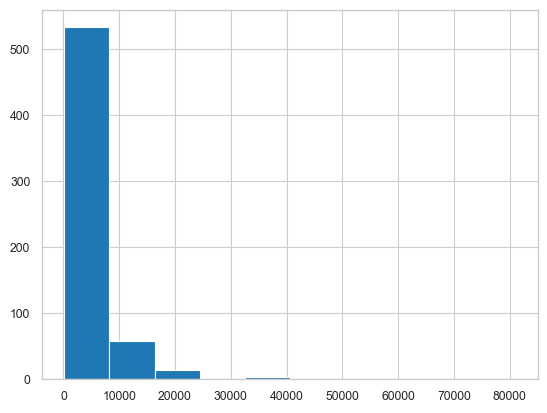
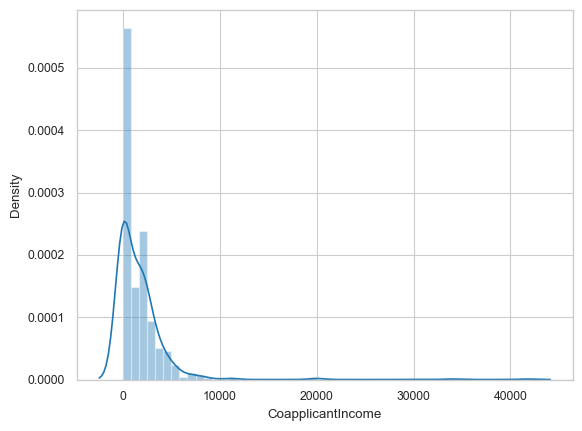
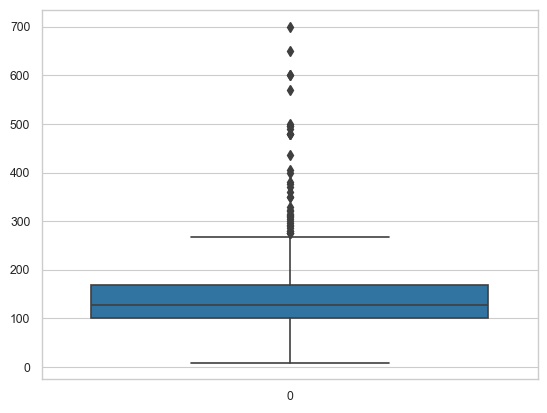
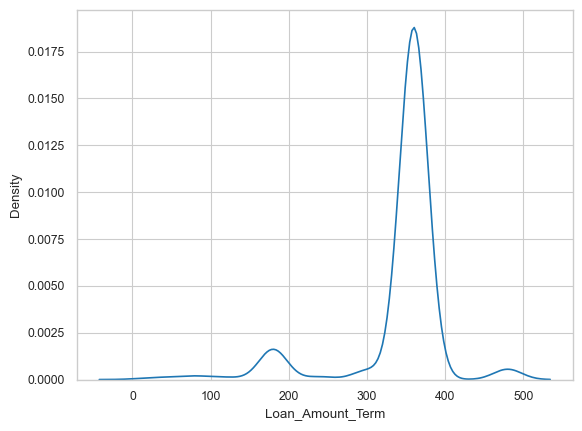
# Plot histograms, distplots, box plots, and/or density plots
df.ApplicantIncome.hist() # histograms
<Axes: >
sns.distplot(df['CoapplicantIncome']) # distplots
<Axes: xlabel='CoapplicantIncome', ylabel='Density'>
sns.boxplot(df['LoanAmount']) # boxplots
<Axes: >
sns.kdeplot(df.Loan_Amount_Term) # density plot
<Axes: xlabel='Loan_Amount_Term', ylabel='Density'>
Data Preparation - Handle unexpected outliers
# Use the function to handle unexpected outliers

def remove_Outliers(df,col_name):
    print("Orig DF Size:"+ str(df.shape) )
    Q1 = np.quantile(df[col_name],0.25)

    Q3 = np.quantile(df[col_name],0.75)

    IQR = Q3 - Q1

    lower_limit = Q1 - (1.5*IQR)
    upper_limit = Q3 + (1.5*IQR)

    print("Lower fence: %.2f" % lower_limit)
    print("Upper fence: %.2f" % upper_limit)

    df_new = df[(df[col_name] > lower_limit) & (df[col_name] < upper_limit)]
    print("New DF Size:"+ str(df_new.shape) )
    return df_new
df.shape
(614, 13)
df_temp = remove_Outliers(df, 'ApplicantIncome')
df_temp.shape
Orig DF Size:(614, 13)
Lower fence: -1498.75
Upper fence: 10171.25
New DF Size:(564, 13)


(564, 13)
Visualize & Analyze Univariate Categorical Variables
df_cat = df_temp.select_dtypes(include=['object'])
df_cat.describe()
| Loan_ID | Gender | Married | Dependents | Education | Self_Employed | Property_Area | Loan_Status | |
|---|---|---|---|---|---|---|---|---|
| count | 564 | 554 | 561 | 550 | 564 | 534 | 564 | 564 |
| unique | 564 | 2 | 2 | 4 | 2 | 2 | 3 | 2 |
| top | LP001002 | Male | Yes | 0 | Graduate | No | Semiurban | Y |
| freq | 1 | 451 | 364 | 321 | 432 | 467 | 215 | 389 |
# Plot barplots, countplots
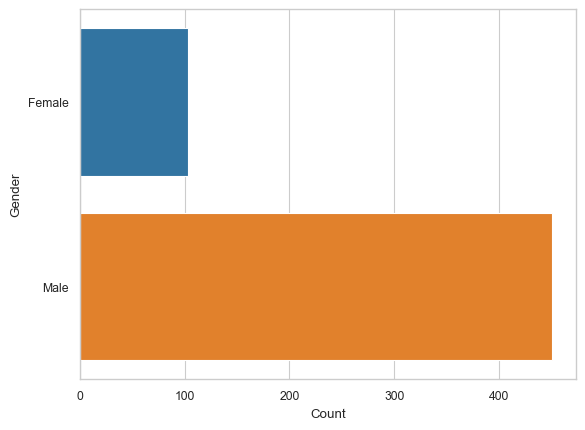
gender_counts = df_cat.groupby('Gender').size().reset_index(name='Count')
sns.barplot(x='Count', y='Gender', data=gender_counts) # barplots
<Axes: xlabel='Count', ylabel='Gender'>
# Plot barplots, countplots
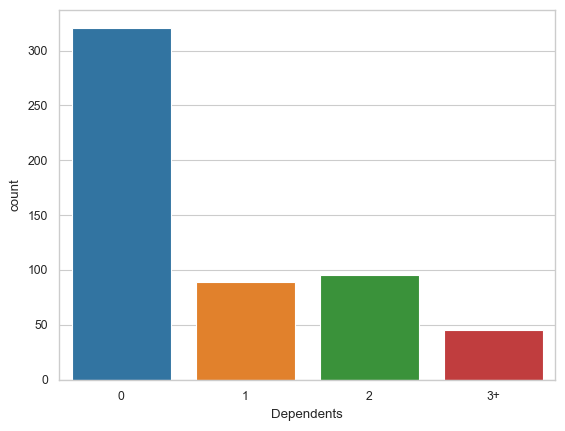
sns.countplot(x='Dependents', data = df_cat) # countplots
<Axes: xlabel='Dependents', ylabel='count'>
Run Multivariate analysis and plots
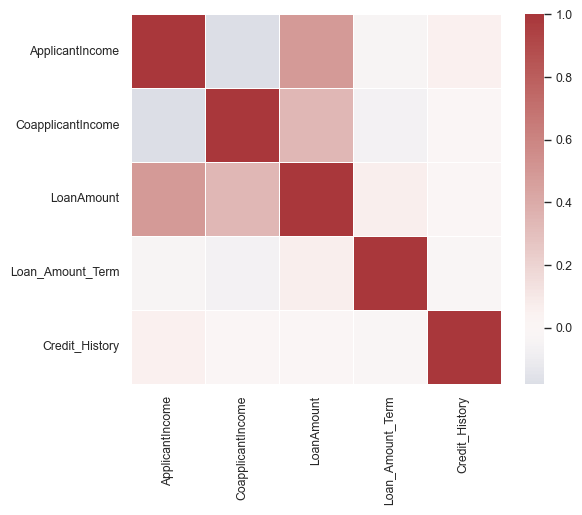
# Check correlation by computing and plotting correlation matrix
corrmat = df_temp.corr(numeric_only=True)
corrmat
| ApplicantIncome | CoapplicantIncome | LoanAmount | Loan_Amount_Term | Credit_History | |
|---|---|---|---|---|---|
| ApplicantIncome | 1.00 | -0.18 | 0.49 | -0.04 | 0.05 |
| CoapplicantIncome | -0.18 | 1.00 | 0.34 | -0.06 | -0.00 |
| LoanAmount | 0.49 | 0.34 | 1.00 | 0.07 | -0.01 |
| Loan_Amount_Term | -0.04 | -0.06 | 0.07 | 1.00 | -0.02 |
| Credit_History | 0.05 | -0.00 | -0.01 | -0.02 | 1.00 |
sns.heatmap(corrmat, cmap="vlag", center = 0, vmax=1, square=True, linewidths=.5)
<Axes: >
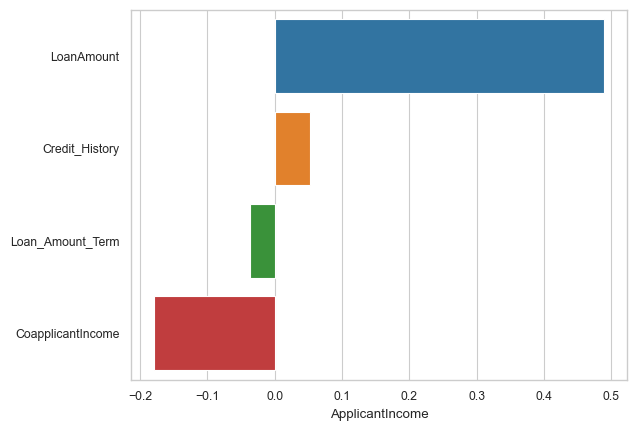
corr = corrmat.sort_values('ApplicantIncome', ascending=False)
sns.barplot(x = corr.ApplicantIncome[1:], y = corr.index[1:], orient='h')
<Axes: xlabel='ApplicantIncome'>
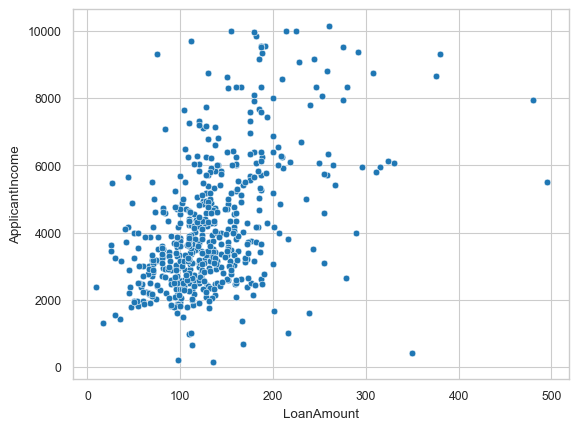
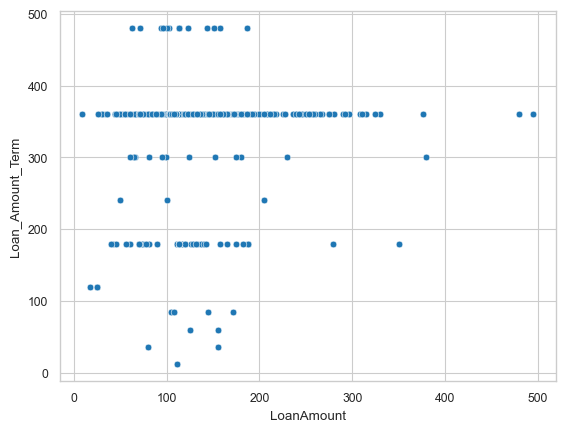
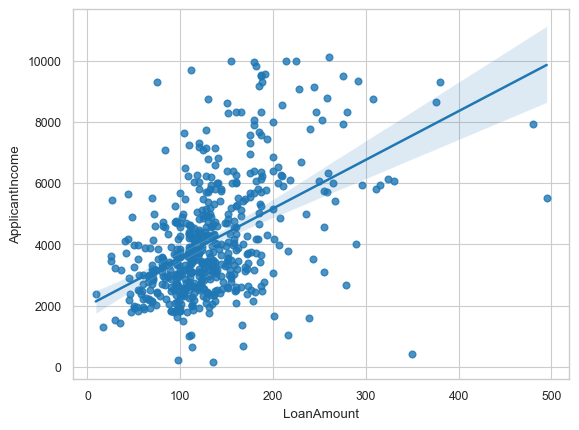
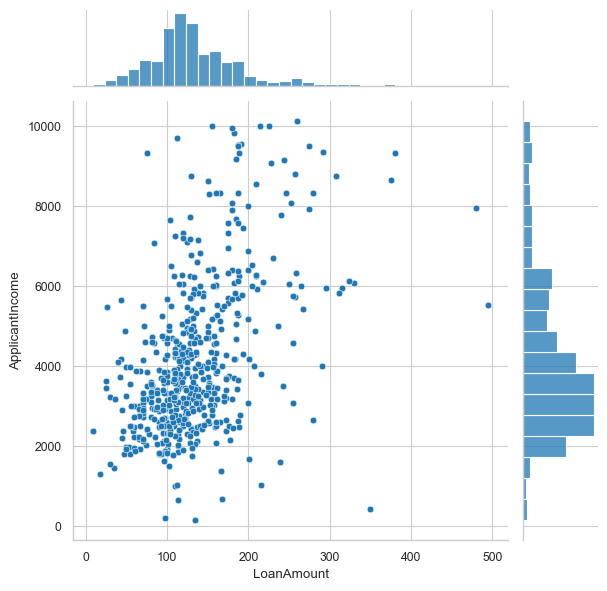
Plot Quantitative vs. Quantitative values together, any observations/insights?
# Plot scatterplots, jointplots, regplots, and pairplots if needed
sns.scatterplot(x='LoanAmount', y='ApplicantIncome', data = df_temp) # scatterplots
<Axes: xlabel='LoanAmount', ylabel='ApplicantIncome'>
sns.scatterplot(x='LoanAmount', y='Loan_Amount_Term', data = df_temp) #scatterplots
<Axes: xlabel='LoanAmount', ylabel='Loan_Amount_Term'>
sns.regplot(x='LoanAmount', y='ApplicantIncome', data = df_temp) #regplots
<Axes: xlabel='LoanAmount', ylabel='ApplicantIncome'>
sns.jointplot(x='LoanAmount', y='ApplicantIncome', data = df_temp) #regplots
<seaborn.axisgrid.JointGrid at 0x1cfa8501910>
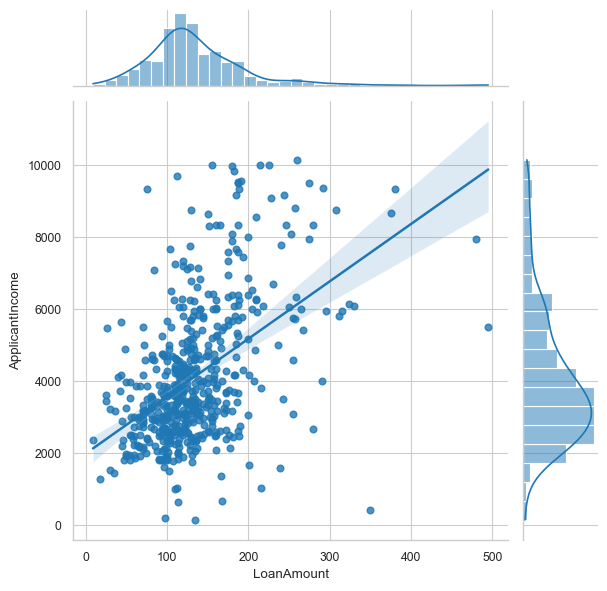
sns.jointplot(x='LoanAmount', y='ApplicantIncome', data=df_temp, kind='reg')
<seaborn.axisgrid.JointGrid at 0x1cfa9701e90>
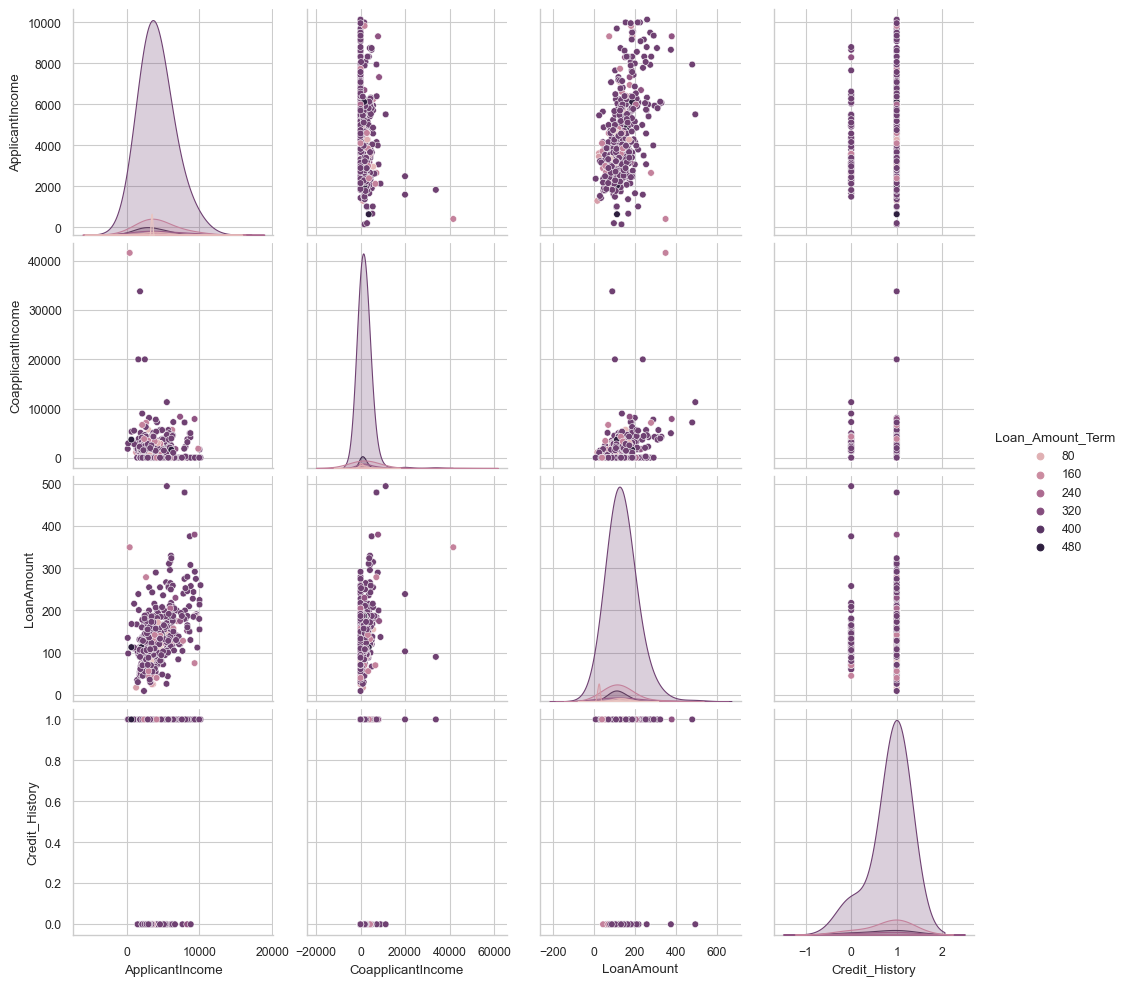
sns.pairplot(df_temp, hue='Loan_Amount_Term', diag_kws={'bw': 1})
<seaborn.axisgrid.PairGrid at 0x1cf9ac98f10>
Plot Qualitative vs. Quantitative values together, any observations/insights?
# Plot boxplots, violin plots, catplots
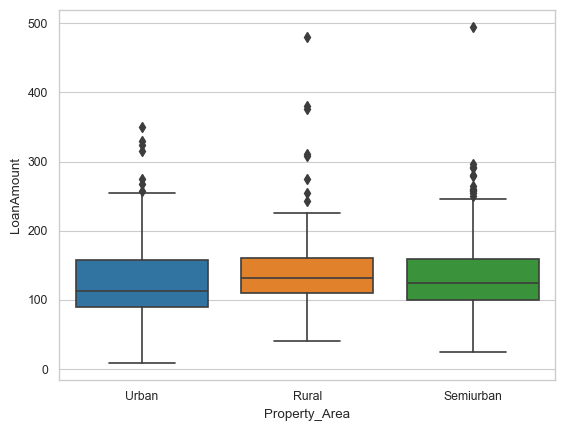
sns.boxplot(data=df_temp,x="Property_Area", y="LoanAmount")
<Axes: xlabel='Property_Area', ylabel='LoanAmount'>
# Plot boxplots, violin plots, catplots
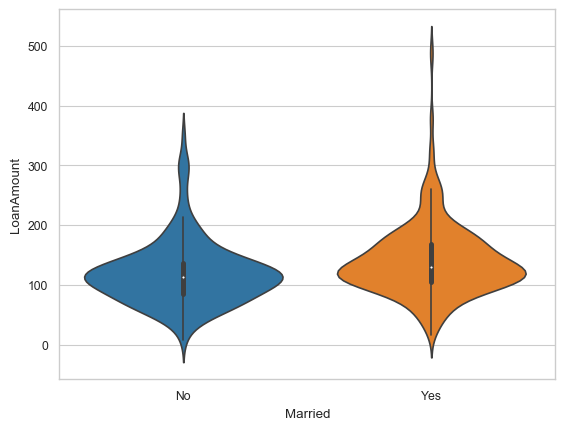
sns.violinplot(data=df_temp,x="Married", y="LoanAmount")
<Axes: xlabel='Married', ylabel='LoanAmount'>
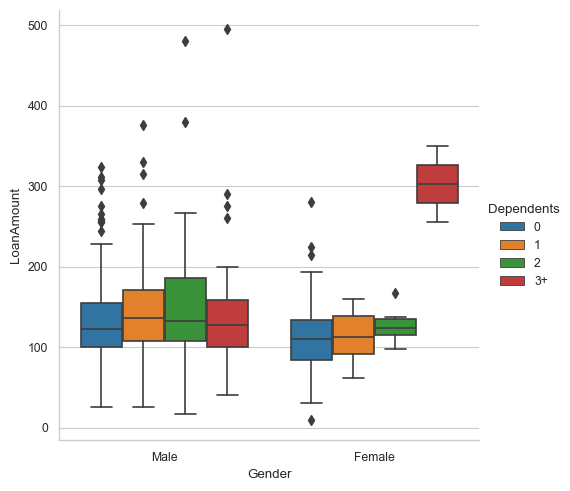
sns.catplot(data=df_temp,x="Gender", y="LoanAmount", hue = "Dependents", kind="box")
<seaborn.axisgrid.FacetGrid at 0x1cfb890c490>
Data Preparation - Category to Numeric
Convert any ordinal features to numeric
# Use OrdinalEncoder or substitution
from sklearn.preprocessing import LabelEncoder
from sklearn.preprocessing import OrdinalEncoder

le = LabelEncoder()
df_temp["Dependents_new"] = le.fit_transform(df_temp['Dependents'])
dep = df_temp.Dependents.value_counts().sort_values(ascending=False)
dep_new = df_temp.Dependents_new.value_counts().sort_values(ascending=False)
pd.DataFrame([dep.index.values,dep_new.index.values,dep.values], index=['dependents','dependents_new','values']).T
| dependents | dependents_new | values | |
|---|---|---|---|
| 0 | 0 | 0 | 321 |
| 1 | 2 | 2 | 95 |
| 2 | 1 | 1 | 89 |
| 3 | 3+ | 3 | 45 |
| 4 | NaN | 4.00 | NaN |
# Using substitution
df_temp['Property_Area_new'] = df_temp['Property_Area']
df_temp = df_temp.replace({'Property_Area_new':{'Urban':0,'Rural':1,'Semiurban':2}})
prop = df_temp.Property_Area.value_counts().sort_values(ascending=False)
prop_new = df_temp.Property_Area_new.value_counts().sort_values(ascending=False)
pd.DataFrame([prop.index.values,prop_new.index.values,prop.values], index=['prop_area','prop_area_new','values']).T
| prop_area | prop_area_new | values | |
|---|---|---|---|
| 0 | Semiurban | 2 | 215 |
| 1 | Urban | 0 | 181 |
| 2 | Rural | 1 | 168 |
df_temp.drop(['Dependents', 'Property_Area'],axis = 1, inplace = True)
df_temp.columns
Index(['Loan_ID', 'Gender', 'Married', 'Education', 'Self_Employed',
       'ApplicantIncome', 'CoapplicantIncome', 'LoanAmount',
       'Loan_Amount_Term', 'Credit_History', 'Loan_Status', 'Dependents_new',
       'Property_Area_new'],
      dtype='object')
Convert nominal features to numeric
df_temp.dtypes
Loan_ID               object
Gender                object
Married               object
Education             object
Self_Employed         object
ApplicantIncome        int64
CoapplicantIncome    float64
LoanAmount           float64
Loan_Amount_Term     float64
Credit_History       float64
Loan_Status           object
Dependents_new         int32
Property_Area_new      int64
dtype: object
# use pd.get_dummies, make sure to join with original dataset and/or drop columns not needed

df_categ = df_temp[['Gender', 'Married', 'Education', 'Self_Employed','Loan_Status']]
df_cat_dummies = pd.get_dummies(df_categ)
df_cat_dummies.head()
| Gender_Female | Gender_Male | Married_No | Married_Yes | Education_Graduate | Education_Not Graduate | Self_Employed_No | Self_Employed_Yes | Loan_Status_N | Loan_Status_Y | |
|---|---|---|---|---|---|---|---|---|---|---|
| 0 | False | True | True | False | True | False | True | False | False | True |
| 1 | False | True | False | True | True | False | True | False | True | False |
| 2 | False | True | False | True | True | False | False | True | False | True |
| 3 | False | True | False | True | False | True | True | False | False | True |
| 4 | False | True | True | False | True | False | True | False | False | True |
df = df_temp.join(df_cat_dummies)
df.head()
| Loan_ID | Gender | Married | Education | Self_Employed | ApplicantIncome | CoapplicantIncome | LoanAmount | Loan_Amount_Term | Credit_History | Loan_Status | Dependents_new | Property_Area_new | Gender_Female | Gender_Male | Married_No | Married_Yes | Education_Graduate | Education_Not Graduate | Self_Employed_No | Self_Employed_Yes | Loan_Status_N | Loan_Status_Y | |
|---|---|---|---|---|---|---|---|---|---|---|---|---|---|---|---|---|---|---|---|---|---|---|---|
| 0 | LP001002 | Male | No | Graduate | No | 5849 | 0.00 | NaN | 360.00 | 1.00 | Y | 0 | 0 | False | True | True | False | True | False | True | False | False | True |
| 1 | LP001003 | Male | Yes | Graduate | No | 4583 | 1508.00 | 128.00 | 360.00 | 1.00 | N | 1 | 1 | False | True | False | True | True | False | True | False | True | False |
| 2 | LP001005 | Male | Yes | Graduate | Yes | 3000 | 0.00 | 66.00 | 360.00 | 1.00 | Y | 0 | 0 | False | True | False | True | True | False | False | True | False | True |
| 3 | LP001006 | Male | Yes | Not Graduate | No | 2583 | 2358.00 | 120.00 | 360.00 | 1.00 | Y | 0 | 0 | False | True | False | True | False | True | True | False | False | True |
| 4 | LP001008 | Male | No | Graduate | No | 6000 | 0.00 | 141.00 | 360.00 | 1.00 | Y | 0 | 0 | False | True | True | False | True | False | True | False | False | True |
#drop original columns
df.drop(columns = df_categ.columns, axis = 1, inplace = True)
df['Loan_ID'] = df['Loan_ID'].str.extract('(\d+)', expand=False).astype(float)
df.head()
| Loan_ID | ApplicantIncome | CoapplicantIncome | LoanAmount | Loan_Amount_Term | Credit_History | Dependents_new | Property_Area_new | Gender_Female | Gender_Male | Married_No | Married_Yes | Education_Graduate | Education_Not Graduate | Self_Employed_No | Self_Employed_Yes | Loan_Status_N | Loan_Status_Y | |
|---|---|---|---|---|---|---|---|---|---|---|---|---|---|---|---|---|---|---|
| 0 | 1002.00 | 5849 | 0.00 | NaN | 360.00 | 1.00 | 0 | 0 | False | True | True | False | True | False | True | False | False | True |
| 1 | 1003.00 | 4583 | 1508.00 | 128.00 | 360.00 | 1.00 | 1 | 1 | False | True | False | True | True | False | True | False | True | False |
| 2 | 1005.00 | 3000 | 0.00 | 66.00 | 360.00 | 1.00 | 0 | 0 | False | True | False | True | True | False | False | True | False | True |
| 3 | 1006.00 | 2583 | 2358.00 | 120.00 | 360.00 | 1.00 | 0 | 0 | False | True | False | True | False | True | True | False | False | True |
| 4 | 1008.00 | 6000 | 0.00 | 141.00 | 360.00 | 1.00 | 0 | 0 | False | True | True | False | True | False | True | False | False | True |
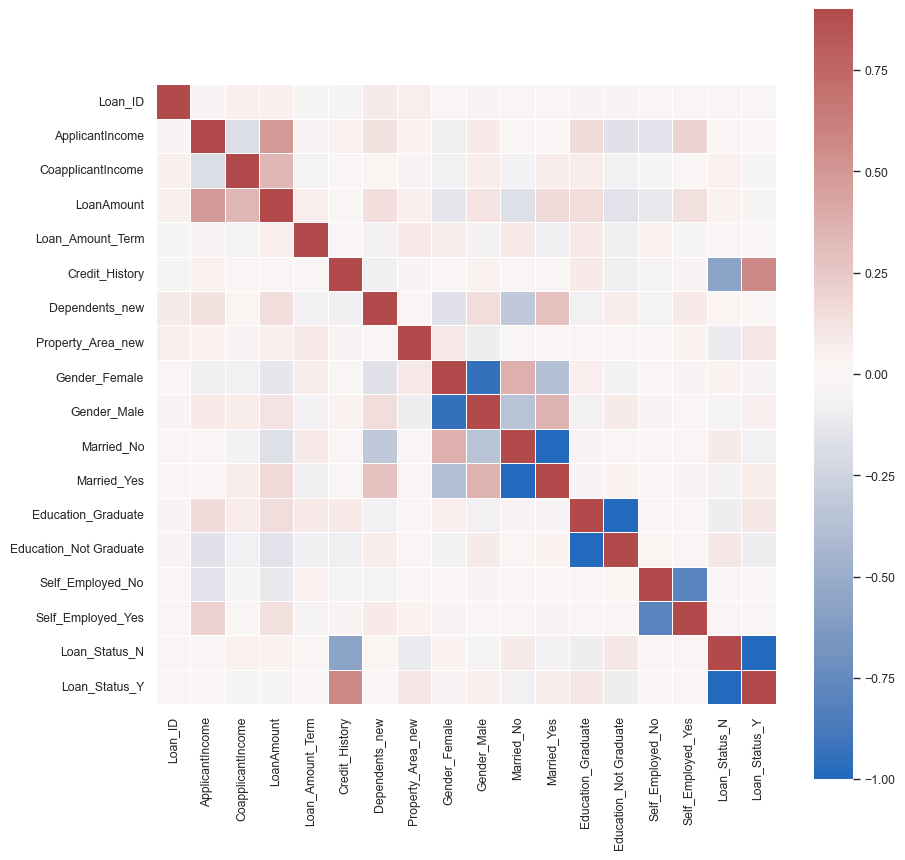
corrmat = df.corr()
plt.figure(figsize=(10,10))
sns.heatmap(corrmat,  cmap="vlag", center = 0,  vmax=.9, square=True, linewidths=.5)
<Axes: >
Scale the numeric columns excluding the target values
df.shape
(564, 18)
df.ApplicantIncome.describe()
count     564.00
mean     4124.72
std      1926.99
min       150.00
25%      2744.00
50%      3638.50
75%      5010.50
max     10139.00
Name: ApplicantIncome, dtype: float64
df.describe()
| Loan_ID | ApplicantIncome | CoapplicantIncome | LoanAmount | Loan_Amount_Term | Credit_History | Dependents_new | Property_Area_new | |
|---|---|---|---|---|---|---|---|---|
| count | 564.00 | 564.00 | 564.00 | 544.00 | 550.00 | 517.00 | 564.00 | 564.00 |
| mean | 1998.41 | 4124.72 | 1692.29 | 133.81 | 341.89 | 0.84 | 0.83 | 1.06 |
| std | 568.48 | 1926.99 | 2979.23 | 59.07 | 65.76 | 0.37 | 1.12 | 0.84 |
| min | 1002.00 | 150.00 | 0.00 | 9.00 | 12.00 | 0.00 | 0.00 | 0.00 |
| 25% | 1539.50 | 2744.00 | 0.00 | 100.00 | 360.00 | 1.00 | 0.00 | 0.00 |
| 50% | 1993.50 | 3638.50 | 1405.50 | 124.00 | 360.00 | 1.00 | 0.00 | 1.00 |
| 75% | 2468.25 | 5010.50 | 2337.00 | 159.25 | 360.00 | 1.00 | 2.00 | 2.00 |
| max | 2990.00 | 10139.00 | 41667.00 | 495.00 | 480.00 | 1.00 | 4.00 | 2.00 |
# Separate the target variable(s)
df_x = df.drop(["Loan_Status_N","Loan_Status_Y"], axis=1)
y = df[["Loan_Status_N","Loan_Status_Y"]]
# Perform scaling

#Import the MinMax Scaler
from sklearn.preprocessing import MinMaxScaler, StandardScaler, RobustScaler

#Instantiate the Scaler
scaler = MinMaxScaler()

#Fit to the data set
scaler.fit(df_x)

#Apply to the data set
scaled_data = scaler.transform(df_x)


#Optional:
#Convert to DataFrame for viewing
df_minmax = pd.DataFrame(scaled_data, columns=df_x.columns, index=df_x.index)
df_minmax.describe()
| Loan_ID | ApplicantIncome | CoapplicantIncome | LoanAmount | Loan_Amount_Term | Credit_History | Dependents_new | Property_Area_new | Gender_Female | Gender_Male | Married_No | Married_Yes | Education_Graduate | Education_Not Graduate | Self_Employed_No | Self_Employed_Yes | |
|---|---|---|---|---|---|---|---|---|---|---|---|---|---|---|---|---|
| count | 564.00 | 564.00 | 564.00 | 544.00 | 550.00 | 517.00 | 564.00 | 564.00 | 564.00 | 564.00 | 564.00 | 564.00 | 564.00 | 564.00 | 564.00 | 564.00 |
| mean | 0.50 | 0.40 | 0.04 | 0.26 | 0.70 | 0.84 | 0.21 | 0.53 | 0.18 | 0.80 | 0.35 | 0.65 | 0.77 | 0.23 | 0.83 | 0.12 |
| std | 0.29 | 0.19 | 0.07 | 0.12 | 0.14 | 0.37 | 0.28 | 0.42 | 0.39 | 0.40 | 0.48 | 0.48 | 0.42 | 0.42 | 0.38 | 0.32 |
| min | 0.00 | 0.00 | 0.00 | 0.00 | 0.00 | 0.00 | 0.00 | 0.00 | 0.00 | 0.00 | 0.00 | 0.00 | 0.00 | 0.00 | 0.00 | 0.00 |
| 25% | 0.27 | 0.26 | 0.00 | 0.19 | 0.74 | 1.00 | 0.00 | 0.00 | 0.00 | 1.00 | 0.00 | 0.00 | 1.00 | 0.00 | 1.00 | 0.00 |
| 50% | 0.50 | 0.35 | 0.03 | 0.24 | 0.74 | 1.00 | 0.00 | 0.50 | 0.00 | 1.00 | 0.00 | 1.00 | 1.00 | 0.00 | 1.00 | 0.00 |
| 75% | 0.74 | 0.49 | 0.06 | 0.31 | 0.74 | 1.00 | 0.50 | 1.00 | 0.00 | 1.00 | 1.00 | 1.00 | 1.00 | 0.00 | 1.00 | 0.00 |
| max | 1.00 | 1.00 | 1.00 | 1.00 | 1.00 | 1.00 | 1.00 | 1.00 | 1.00 | 1.00 | 1.00 | 1.00 | 1.00 | 1.00 | 1.00 | 1.00 |
# Join back the target variables
df_prep = df_minmax.join(y)

df_prep.head()
| Loan_ID | ApplicantIncome | CoapplicantIncome | LoanAmount | Loan_Amount_Term | Credit_History | Dependents_new | Property_Area_new | Gender_Female | Gender_Male | Married_No | Married_Yes | Education_Graduate | Education_Not Graduate | Self_Employed_No | Self_Employed_Yes | Loan_Status_N | Loan_Status_Y | |
|---|---|---|---|---|---|---|---|---|---|---|---|---|---|---|---|---|---|---|
| 0 | 0.00 | 0.57 | 0.00 | NaN | 0.74 | 1.00 | 0.00 | 0.00 | 0.00 | 1.00 | 1.00 | 0.00 | 1.00 | 0.00 | 1.00 | 0.00 | False | True |
| 1 | 0.00 | 0.44 | 0.04 | 0.24 | 0.74 | 1.00 | 0.25 | 0.50 | 0.00 | 1.00 | 0.00 | 1.00 | 1.00 | 0.00 | 1.00 | 0.00 | True | False |
| 2 | 0.00 | 0.29 | 0.00 | 0.12 | 0.74 | 1.00 | 0.00 | 0.00 | 0.00 | 1.00 | 0.00 | 1.00 | 1.00 | 0.00 | 0.00 | 1.00 | False | True |
| 3 | 0.00 | 0.24 | 0.06 | 0.23 | 0.74 | 1.00 | 0.00 | 0.00 | 0.00 | 1.00 | 0.00 | 1.00 | 0.00 | 1.00 | 1.00 | 0.00 | False | True |
| 4 | 0.00 | 0.59 | 0.00 | 0.27 | 0.74 | 1.00 | 0.00 | 0.00 | 0.00 | 1.00 | 1.00 | 0.00 | 1.00 | 0.00 | 1.00 | 0.00 | False | True |
### Write the prepared dataset into a new file
#Save as a csv
df_prep.to_csv('\\Users\\cbaruc\\Downloads\\EDA\loans_train_prep.csv')